|
















 
| |
Welcome to Seattle Access
A Forum for Microsoft Access Users and Developers
www.SeattleAccess.org
Your source for meeting information,
newsletters and presentation content for
the
Seattle Access Group (meeting
info)
and the
Pacific Northwest Access Developer Group
(meeting info)
|
Items For Immediate Attention
SAG
and PNWADG
t t
COMC.com
and Tim Getscht
t
New host of the SAG and PNWADG
6727 185th AVE NE, Redmond, WA.
Registration begins at 6
Meetings start at
6:15 PM ... PNWADG wraps up about 9:30
Pizza and networking break starts between 7:30
and 7:40
ll
April Features
ll
6:30 Upsizing to SQL Server - by Willie McClure, Datarim, April 16,
2014
Details
below
~7:45 Show and Share
our Favorite Tools and Techniques
- so bring YOUR demos!!
Details below
- Send Automated Emails
without Security Warning By Vicki Schweickart
-
Custom Upsizing Tools -- From Access to
SQL Server, by Willie McClure
- Other
topics and presenters to be announced on Wednesday --
It’s time to Show n Share - so bring your laptop and files.
Pre-Register your demo
New Access Team Blog -- Focused on Support Issues
(April
2014)
We have another resource for researching and
resolving issues that have been reported to the Microsoft Access
team. This blog will share posts by the Microsoft Access support
team about issues that they are/have been working on. It’s a little
bit of a “one way street” - in that the topics and content are
selected and provided by the team, but you can have confidence in
the content when you are trying to resolve an issue that they have
covered. So … you can add this to your list of Favorites >> Access
Resources
Need Test Data --
Check out
GenerateData.com
(April 2014)
Open source tool that allows you to generate limited
or large volumes of data in a variety of formats. In addition to
the free tool, you may also choose to make a donation and leverage
their resources to generate up to 5,000 records at a time. This is
used and recommended by fellow Access MVPs, so let me know what you
think … ;~S
PAUG 2014 Database
Designer International Conference at Silver Falls (April
2014)
Sold out for 2014 --- so mark your calendar for 2015
registration -- opens 1/1/2015.
http://www.paug.com/Conference.asp
Several new links to
Training, Conference sessions and other resources -
Details
Below and at SeattleAccess.org
*Anyone
can build a SharePoint App with Microsoft AccessAnyone can build a
SharePoint App with Microsoft Access (from SPC204)
*Rich
extensions to SharePoint Apps using Microsoft Access (from SPC335)
*The
'how to' guide for selling and managing SharePoint Apps built using
Access (from SPC338)
*Update
on InfoPath and SharePoint Forms (from SPC 348)
*Virtualizing
your data center with Hyper-V and System Center
*Success
with Hybrid Cloud
*Digital
Copyright Template
ll Upcoming Presentations
ll
Harnessing the Power of Queries - Leveraging subqueries and
worktables
Demos of Current Projects
-- Likely, four 15 minute demos to show, share and ask … How about
YOU??
Indexes
-- leveraging Access features
to optimize performance
Third Party Tools
--
Short demos and discussions of YOUR favorites. We need a few
volunteers. Ready to sign up?
Logical Database Design – Building Sound Table Structures,
By Mike Hernandez, Consultant, Trainer, Presenter, Renaissance Man
Bring your laptop or files so that you can share with the group:
t
Q&A --
Bring your questions, database files.
t
TIPS --
Share a favorite or new technique or tip.
t
Web Apps --
Working on a Web App? Share your questions, highlights and
goals with the group.
t
Windows 8 Features
and Apps - Share your
“favorites” with the group,
Have a
presentation suggestion or request?
Email topic suggestions
and details to
Teresa@DataDynamicsNW.com

t
Professional Access 2013 Programming
t
by Teresa Hennig, Ben Clothier, George Hepworth, Doug
Yudovich !!!!!
Order our Access 2013 book from
Wiley
ll BOOK
SIGNING --
Professional Access 2013 Programming!!
ll
The books are HERE! …
8 Winners received signed copies at the meeting ;~S You can also
request your signed copy from Teresa or check out the book at:
www.wiley.com/go/proaccess2013prog
Excerpt from announcement
“This was truly an MVP achievement!!! We must have
set a record for the number of Access MVPs on a book team --
including many of you. As more people were recruited to ensure the
caliber and content, I created new roles and convinced the publisher
they are such an integral part of this team that they should ALL
have their bios in the book! You’ve GOT TO check them out!!!
Here’s the team … do you recognize everyone???
An
excerpt from the Intro:
Written by a team of Microsoft Access MVPs,
this book leverages our expertise and passion for Access. In
expanding the reach of Access, we incorporated the knowledge and
experience of over a dozen experts to consult, test, and provide
examples working with SharePoint, SQL Server, .NET, and web
development. And to make sure that we could provide a model for a
robust business solution, we worked closely with the Microsoft
Access team to be at the forefront of defining, testing, and
implementing the new features for Access 2013 web apps.
t t Calendar
Year Dues -- $30/group or $45 Both groups
t t
Annual
membership is only $30 for one group and $45 for both groups! That’s
right -- BOGO 50% off!!! This may be the deal of the decade. The
cost of dual membership is LESS than it was in 2008 -- but the value
of the tips, tools, resources and networking is *priceless.*
Dues
may be paid at the meeting or contact Teresa for mailing
instructions.
… Paid Members participate in Drawings and Product
Reviews! Please make checks payable to PNWADG and use the memo line
to identify the member name and group(s).
Tips and Discussions and Events
Office 365 Home -- $99/year for five installs!
Feb 2014
Wondering what that includes? A picture’s worth a thousand
words …

YES … ACCESS!!!! And Yes, that is Skype to landline calls … So,
what are you waiting for?
http://www.microsoftstore.com/store/msca/en_CA/pdp/Office-365-Home-Premium/productID.286397700
Download
Microsoft Office Professional Plus 2013
Get
the full featured version for a 60 day trial period.
Download
*Digital
Copyright Template by
Tech Pro Research
(March
2014)
We are awash with digital programs and content to support always-on
connectivity, the blending of consumer/business devices and
increased local/remote storage capacities. The Tech Pro Research
digital copyright policy will help organizations seeking to set
guidelines for digital programs and content.
*Anyone
can build a SharePoint App with Microsoft Access (from SPC204)
(March
2014)
Come to this session to learn how power users can easily
and quickly build SharePoint apps with a full SQL back end without
writing any code. You’ll learn how to create rich UI SharePoint apps
using Access with low to no involvement or impact from IT.
*The
'how to' guide for selling and managing SharePoint Apps built using
Access (from SPC338)
(March 2014)
SharePoint applications created by Access are real SharePoint apps that
you now can put in the Office Store. These no-code data centric web
apps are part of Office 365. To make the publishing of these apps
complete, Access has added features to help you deploy upgrades to
existing apps. So you can deploy new versions of an app in
production without losing their data. See a demoin the
session
video.
*Update
on InfoPath and SharePoint Forms (from SPC 348)
(March 2014)
This
InfoPath session shows some of the Access team’s very
early work in this space with Access. It provides an introduction to
the vision and roadmap for the Office Forms
* Microsoft Virtual Academy - Free Course
(March 2014)
Virtualizing your data center with Hyper-V and System Center
-
Learn how
Whether you’re new to virtualization or have some experience,
explore this free online training to build your infrastructure from
the ground up on the Microsoft stack using System Center (IT Focus).
* Learn about Hybrid Solutions
(March 2014)
Success with Hybrid Cloud
Workload spikes can wreak havoc on your organization’s
infrastructure. Learn about a Hybrid technique called cloud bursting
that allows the enterprise to expand its capacity and get started
with Windows Azure.
Read more
Start your Windows Azure trial
Veeam -- Modern Data Protection™
--
Feb 2014
Whether you use VMware vSphere, Microsoft Hyper-V or a
combination of both, Veeam® Backup™ Free Edition is a perfect fit
for your environment. No matter how you do regular backups, Veeam
Backup Free Edition is the must-have tool for managing your VMs.
http://www.veeam.com/free-vm-backup.html Wondering
if you need business insurance? Feb
2014
We’ve had this topic come up in
the past, so I’ll take this opportunity to share some excerpts from
a discussion where George Hepworth shared some of his knowledge
based on his experience of writing training materials for an
insurance company. Things to consider:
1.
There is a difference between
commercial general liability coverage and Errors & Omissions
coverage.
a. Commercial
liability coverage protects against things like starting a fire that
destroys a customer’s premises. However, it will not pay nor provide
legal defense if when sued for defects in software you deliver to
that client.
b.
Your E & O coverage will protect
you against lawsuits for things like failure to deliver the software
you contracted to provide as well as defects in that software.
2.
Every business (likely) needs
commercial liability coverage; professionals providing services may
also need E & O.
3.
Personal liability coverage
typically excludes any claims arising out of providing professional
services; you need commercial and E&O coverage regardless of whether
you have any personal coverage.
4.
At times, the legal defense
provision of liability coverage can be at least as valuable as the
indemnification provision. That’s because the insurance company will
either:
a.
pay a claim (up to the limit of
insurance) on behalf of a policyholder when it deems the claim to be
valid, or
b.
provide legal counsel to defend
the policyholder if it deems a claim to be invalid.
The amount spent on such defense can be considerable and is separate
from and in addition to any judgment amount awarded against you by a
court. That’s good and bad, of course. There is an incentive for the
insurance company to minimize its overall costs (defense +
indemnification), so the insurer may settle a claim against a
policyholder rather than drag it out in court while the lawyers’
fees spiral. The indemnification amount is often less than it would
cost to go to court, where you’d still risk losing the case—and have
to pay the claim-- anyway after incurring huge legal bills.
5.
If a client requires you to
provide proof of insurance, it might be good to clarify whether they
are interested in general commercial liability or E&O coverage. The
former won’t help you if your database causes loss of income due to
inadequacy in design or development. The latter will.
Thank you George.
Access Blog – by the Access Team --- one of the top blogs on MSDN!!!
Stay tuned to the community …
The team shares insights into their schedule, their favorite
features, new features and how to use them. This is also an ideal
avenue for the team to talk about issues that are of interest to the
Access community. You’ll learn about the people and some of the
factors that are helping to shape the future of Access. Whether
you’re a seasoned developer or just learning about Access, you’ll
find invaluable information and techniques. From creating a
database template to getting help when you need it,
The Access Blog covers the gamut.
Meeting Files and
Materials
Presenters are encouraged to provide slides, demos and other files
that members can download from the SAG website. These can be
excellent resources for learning about new features or techniques
and figuring out how to incorporate them into projects. If files or
links are available, they will be posted on the Seattle Access
website.
As we gain experience with Live Meeting, we will record and share
links to select sessions.
* * * * *
* * * * *
* * * * *
* * *
? ? ?
Want to receive the newsletter by email? ? ? ?
Please ensure that you have specified the domain
DataDynamicsNW.com as a Safe Sender in your local AND in your
online email provider/service. Several accounts/servers
have rejected the newsletter as spam due to the number of links
to content. So, you may need to adjust the settings via your
online (Comcast, gmail, hotmail, etc) or business email provider.
* * * * *
* * * * *
* * * * *
* * *
Standard Monthly Meeting Format
In
general, each group will have about 75 minutes for their meeting;
including general announcements, Q&A, and the main presentation.
In order to best server our members and presenters, the start and
end times will vary based on the specific circumstances.
We
invite everyone to join us for pizza and networking. Dues are
voluntary and help offset meeting costs. We ask those who have not paid
dues to
contribute $5 per evening.
* * * * *
* * * * *
* * * * *
* * *
Downloads and Resources
- Lots of new Links
Access 2010 Programmer's Reference
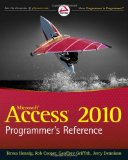 By
Teresa Hennig, Rob Cooper, Geoffrey Griffith and Jerry
Dennison, contributors and editors, Armen Stein, Jeff Boyce, Albert
Kallal, Doug Yudovich, Ben Clothier. Tips contributed from our
esteemed colleagues Dane Miller, Garry Robinson, Steve Schapel, and
Larry Strange. By
Teresa Hennig, Rob Cooper, Geoffrey Griffith and Jerry
Dennison, contributors and editors, Armen Stein, Jeff Boyce, Albert
Kallal, Doug Yudovich, Ben Clothier. Tips contributed from our
esteemed colleagues Dane Miller, Garry Robinson, Steve Schapel, and
Larry Strange.
Contact
Teresa for a signed
copy -- or order from
Amazon with Teresa’s link.
Limited Time Offer for a Free Chapter
Chapter 7, Using VBA in Access
(provided by Wiley Publishing, who retains the copyrights for this
work.)
This book focused primarily on traditional Access deployments
with local (vs web) deployments. So the content, examples and code
provide invaluable guidance for Access 2013 client/server solutions.
EARLY REVIEW: "I
have to say that you have surpassed yourself with the Access
Programmer's Reference this time. Very, very nice. I usually use
books like that for reference, to look up stuff when I have a
question, but in this case I have literally been reading it in large
chunks and finding it hard to put down. Especially the new
Access 2010 functionality, I have already learned heaps.
So thanks a lot for that, I just wanted to let you know that I am
mighty impressed with this one. :-) " Steve Schapel, Access
MVP
Our Book on Database Models!
Microsoft Access Small Business Solutions,
:
State-of-the-Art Database Models for Sales, Marketing, Customer Management, and
More Key Business Activities
Written by an unparalleled team of Access MVPs-
Co Authors: Teresa Hennig, Truitt Bradly,
Larry Linson, Leigh Purvis and Brent
Spaulding
Contributors and Tech Editors: Jerry Dennison, George Hepworth and Doug
Yudovich;
Tech Editors: Arvin Meyer and Armen Stein
Limited Time Offer for a Free Chapter
Chapter 4, People, Organizations, Addresses
(provided by Wiley Publishing, who retains the copyrights for
this work.)
Arguably the most comprehensive compilation of guidance and
database models available. In addition to the printed material, the
companion CD provides 76 files, including 31 databases.
An invaluable resource for the business person -- those who know
their industry but may not have experience with Access. With this
book, they can design a custom database with confidence! The book is
also full of amazing tips that will give experienced developers an
edge, especially when expanding into new areas. Plus, the Bonus
Resource database is filled with tools and tips that can be
incorporated into your projects - and become the foundation for your
custom toolbox.
Learn how to design properly normalized database models for dozens
of business applications.
-- ORDER HERE!
Teresa,
I love your books. I have them all.
RibbonX 2007 helped me creating stunning ribbons for my Access
applications. Mudhafar July 2010
RibbonX
Customizing the Office 2007
Ribbon
 By Robert Martim,
Ken Puls,
Teresa Hennig
By Robert Martim,
Ken Puls,
Teresa Hennig
Order NOW from Amazon
The best book on the subject ... and the content is still valid for
2013!
From the fundamentals through complete examples for Access, Excel and Word,
this book provides the information and walks you through the steps to
customize and create Ribbons in all three programs.
Limited Time Offer for a Free Chapter
Chapter 17
- Security in Microsoft Office
(Provided by Wiley Publishing, who retains the copyrights for this
work.)
Although written primarily for 2007, most aspects apply to 2010 and
2013, plus
several areas are applicable to Office 97 through 2003.
More excellent tips on working with Excel, visit site of co-author
Ken Puls, Excel MVP.
Calendar Year Dues ...
Demonstrate your support and appreciation ...
Still only $30 each and voluntary!
Or
Join
BOTH groups for only $45!
Since we started collecting dues, neither group as ever imposed a dues increase!!!
Please support your groups by becoming a paid member and
VOLUNTEERING ;~S
Members only drawings, downloads, software, reviews and more.
|
| |
|
Seattle Access
Group Meeting
Third Wednesday -- hosted at COMC.com Redmond
(Return to TOP)
Newsletter
April 16th 2014
Upsizing to SQL Server - by Willie McClure, Datarim,
April 16, 2014
How to upgrade an Access backend to SQL
server while keeping your frontend more or less intact,
including the ramifications of linking, naming
conventions, maintenance and data transfer.
In addition to sharing his expertise and techniques,
Willie is creating some helpful utilities that will be
available for attending members. SOOOOO, you’ll
definitely want to stay tuned and join our second
session for the demos of tools.
Willie has been using Access since 2.0 and
has more than 35 years in the computer industry. He
founded Datarim, Inc. in 1998 to provide computer
technology, database, and information needs to meet
increasing demand for specialized business technology
services. He continues to be involved in every aspect
of Datarim's software development and professional
services and has created much of Datarim's product line
using Access, SQL and Visual Basic. Visit
www.Datarim.com and you can see examples of past
projects in the custom solutions section.
Willie specializes in data conversion, warehousing, user
interfaces, utilities and API interfaces and is
currently available for consulting opportunities. Join
us Wednesday to meet Willie and glean valuable tips as
he shares his experiences, expertise, and tools.
Please
RSVP Teresa@DataDynamicsnw.com so that we can ensure adequate
seating and refreshments.
Live Meeting Session ... Please pre-register with Teresa
RSVP for Live Meeting
Wednesday's session will start
between 6:20 and 6:30 --
|
|
Meeting Location
Cafe for Building 40
Directions:
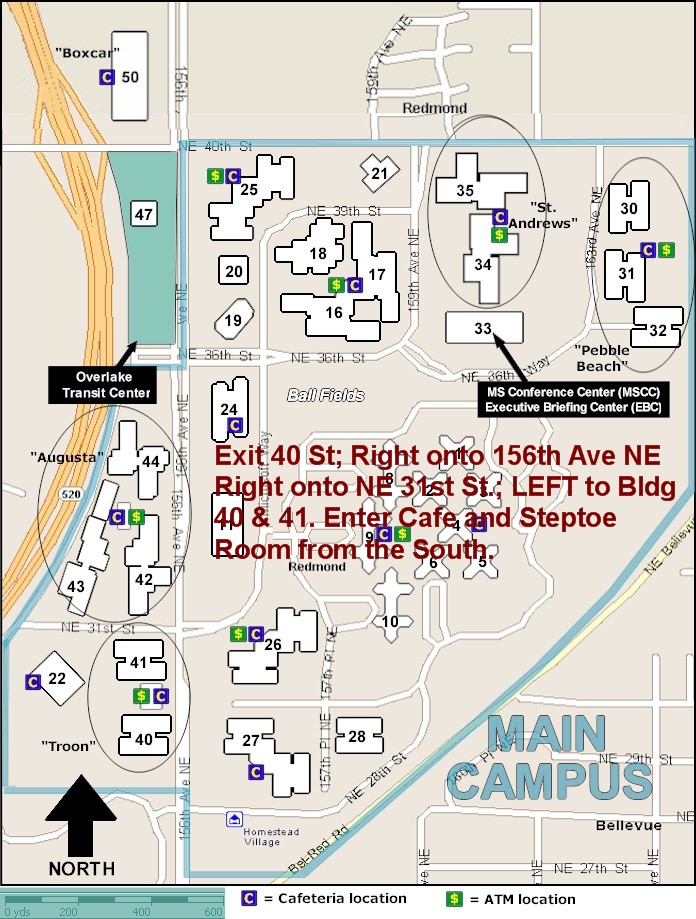
From SR 520 Eastbound ...
Exit NE 40th, Turn RIGHT onto NE 40th, and move
into the far right lane. Turn RIGHT onto 156th NE -
heading South.
Turn RIGHT onto NE 31st.
Turn LEFT onto the access road for
Buildings 41 and 40
Turn RIGHT into the parking garage.
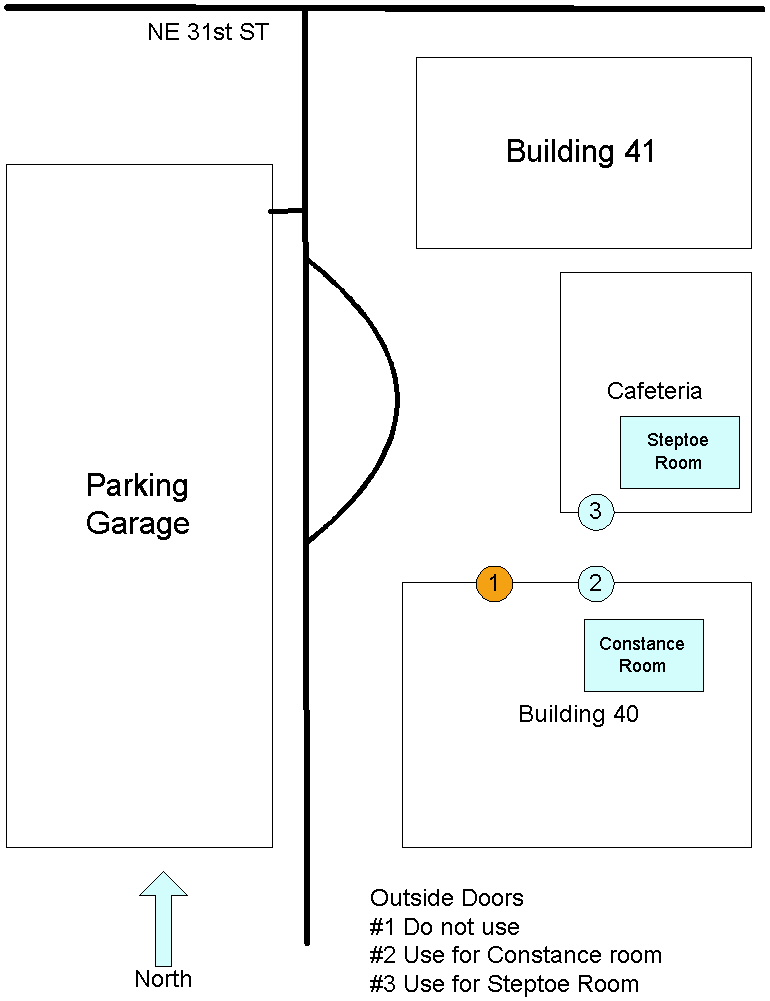
As you walk from the garage,
Building 40 is on the RIGHT and the Cafe is the single story
building in the middle. Walk the length of building 40, to get to
the side entrance of the cafe.
Meetings are in
the STEPTOE Room in the Cafe. The entrance is on the right
side, by building 40. The meeting room is immediately to the right.
Map of Campus area
including Building 40
Diagram of Cafe and Buildings 40
and 41
(Hot
List) |
|
Pacific
Northwest Access Developer Group
Third Wednesday
-- hosted at COMC.com Redmond
(Return to TOP)
Newsletter
April 16th
Show and Share
Your Favorite Tools and Techniques
-- so bring YOUR demos!!!
YOU asked and
you shall receive … this is YOUR time to share your
favorite tool, technique, add-in, template …
To pre-schedule your demo, please email
Teresa@DataDynamicsNW.com. … We’ll also save time
for impromptu demos -- So please bring your laptops and
files so that others can learn from your experiences.
Send Automated Emails without Security Warning By Vicki
Schweickart
One of the things we appreciate most about building
applications in Access is the ability to integrate
easily with other Microsoft Office applications. It is
possible to create very powerful business solutions that
can have a huge impact on efficiency and accuracy. A
single click can generate emails with subject lines,
distribution lists, messages and attachments that are
tailored for each recipient. One challenge when
integrating with Outlook is sending email messages
automatically, without having a user there click "OK"
when the security message pops up: "A program is trying
to automatically send email on your behalf. Do you want
to allow this?" This presentation will highlight a
third party tool called vbMAPI that can be integrated
directly into your Access project and will allow you to
interface with Outlook without using the Outlook Object
Model - thus avoiding the dread security message.
Vicki is a freelance developer specializing in business
solutions for small companies and start-ups.
Custom Upsizing Tools -- From Access to SQL Server, by Willie
McClure
As follow-up to his presentation on preparing and
upsizing to SQL Server, Willie will share some custom
tools that he has created to more efficiently and
consistently work through the upsizing process.
Other
topics and presenters to be announced on Wednesday --
It’s time to Show n Share - so bring your laptop and
files.
Please RSVP
Teresa@DataDynamicsnw.com
so that we can ensure adequate seating and
refreshments.
Remote viewing will be available by advanced
registration. Use email link:
Teresa@DataDynamicsnw.com
**Volunteers needed to monitor/manage the LiveMeeting
comments and questions.
Contact Teresa~!
sPNWADG – Bring A COLLEAGUE TO OUR MEETINGS!!!
Please … share the newsletter and invite your
co-workers, Friends and students to join us.
Would YOU like to Share Your
Experience and Expertise?
Send an email to
Teresa and get scheduled for our next Developer Demos event?
Receive PNWADG Newsletters
(Hot
List)
(Return
to TOP) |
|
Usability Studies
(Return
to TOP)
Immediate Opportunities for
Microsoft User Research Studies
Are
you a business professional? Microsoft wants to hear from you!
Microsoft User Research conducts end-user research on all
Microsoft products. Sign up to be contacted for user research
studies that match your experience and interests, and help impact
the future of Microsoft technology.
New
opportunities not limited to Microsoft usability studies. Please
email Teresa if you would like your contact info
forwarded to the recruiter.
(Hot List) |
|
CONGRATULATIONS TERESA!

INETA
2011
Community Champion
Profile & Photo
“The purpose of the INETA Community Champion Award program is to
recognize individuals with the highest levels of contributions.
Those exceptional leaders and volunteers who devote innumerable
hours towards hosting user group meetings, ...”
|
|
 Community
Credit Community
Credit
recognizes
Teresa Hennig
for
her commitment and contributions
to the developer community. May 2009.
More info
soon at Data
Dynamics Northwest. |
The
purpose of this site is to enhance our user group communications,
share information about Access and provide links to relevant
resources.
Access users and developers will want to stay tuned as we continue
to demonstrate how to integrate Access with .NET and other
applications.
Our meetings are welcoming forums for networking, sharing and
learning.
Join us for fun, informative evenings. |
|
Links, Tips and Downloads and More
...
Mr Excel – Excel tips and support; Learn Excel from Bill Jelen (May 2012)
MrExcel represents an entire community
of Excel power users how are sharing their expertise, experiences and time
through blogs, podcasts, tips, forums and links to a wealth of other
reference materials. Among the links you’ll find Bill Jelen’s podcasts and
books – including several that can be invaluable tools in Access projects –
such as the random number selector. Visit the
website, and check out the
blog and videos.
Rick Fisher's Find and Replace
(May 2011)
Rick's tool will search through the design elements, such
as the table and field names and modules (not the data). It can
change the names of objects throughout the entire database. Version
9.0 works with Access versions from 2000 through 2010. Visit
Rick's site for
more details and the download.
Doug Steele's Web Site
(May 2011)
Access MVP
and author of “Access Solutions” shares tips and links to
other resources on his
website.
Optimize Access when using ODBC data source
(May 2011)
Article referred to in
George Hepworth's presentation April 2011 on DNS Less data
connections.
KB286222
PrimoPDF – The
World’s #1 free PDF Creator -
at least according to them. (July 2008)
PrimoPDF offers both a free and professional version that will
work with Windows 98 through Windows Vista and can work with over
300 file types. Willie really likes PrimoPDF for client
installations because it is remarkably simple and leaves a VERY
SMALL footprint. Let me know what you think.
Virtualization Via
HyperV
Are you ready? Are you hyped?
We’ve been talking about it and our launch presentations will cover
some of the key features and benefits. And NOW ... Microsoft has
released Hyper-V for Windows Server 2008!
Read more
SecureAble
- What can
Your Processor do?
(July 2009)
A great tool that identifies
some key features and capabilities of your processor chip, such as
the bit length, if the memory can store non-executable files, and
how it will support hardware virtualization. Did I mention it is
free? Learn more and get the free download.
Tips & Tricks – Webcasts and Podcasts
from the Experts
Microsoft Webcast Home
provides links to valuable resources from
the experts. These webcasts and podcasts include great tips,
lessons, recommendations and other invaluable tidbits. and ... it’s
FREE!
Access 2003 Solution Center
This is a great starting point to find solutions, downloads, current
topics and links to the latest updates.
Free online Training –
Check out the courses
and send comments and send me an
email to suggest additional modules!
21
courses for Access 2007
18 courses for Access 2003
For additional and past postings check pages for Links, Downloads,
etc(Hot
List)
(Return
to TOP) |
| CIPS
Connections
Teresa Hennig, Access MVP
interviewed by Stephen Ibaraki. FCIPS, I.S.P., DF/NPA, CNP, MVP
Teresa's thoughts and recommendations for user groups, developers,
managers and businesses in general. |
|
Interview
Response
...
You provided an incredible contribution Teresa!
The very fine interview clearly demonstrates your passion,
experience, insights, commitment, dedication ... It's also evident
that you spent considerable time in thinking about and providing
your responses. Your hard work and focus on value is very much
appreciated. In fact, I feel so inspired by your efforts!
Thank you for taking the time and special care with the interview
and sharing your considerable insights with the world. You are a
very talented and gifted person who touches the lives of so many.
Moreover, you are making a significant historical contribution to
our society, industry, and profession.
The world is
like spiders web, you touch one corner and the whole thing shakes.
And such is
your personal vision, voice, and work -- you touch all of us and
impact our vision and lives for the future.
Stephen Ibaraki,
FCIPS, I.S.P., MVP, DF/NPA, CNP
|
|
From My Client ...
May 4, 2007
Teresa,
"This could not have been any
truer!"
“I also have time for my clients. Actually, I'm as
passionate about my clients and their projects as I am about my
groups. As a consultant, I am incredibly fortunate to get to work on
projects from a wide spectrum of industries. Every project provides
new challenges for finding ways to manage data, streamline and
automate. Understanding my client's industries, operations and
needs, I feel like I'm their partner and it is important to provide
cost effective solutions. With the savings and benefits, my
solutions typically pay for themselves in a matter of months. My
biggest reward is knowing that I truly made a difference.”
"I am EXTREMELY PROUD OF YOU and equally happy! WOW!!!"
C. DiFranceisco
America First Search & Abstract, Inc. |
|
 Seattle Access
Groups members are offered a
10% discount on
FMS products. Seattle Access
Groups members are offered a
10% discount on
FMS products. |
|
 Supporting .NET User Groups
 |
 10% discount to members!
Edge Tech Corp is a leading memory supplier. EDGE sells 100% compatible
Dell Memory and other DRAM upgrades. EDGE also offers flash drives and
portable hard drives.
|
|
What it Means to be an Access MVP
Thank you for sharing your passion and expertise and
invigorating communities globally ...
Steve Ballmer, CEO Microsoft
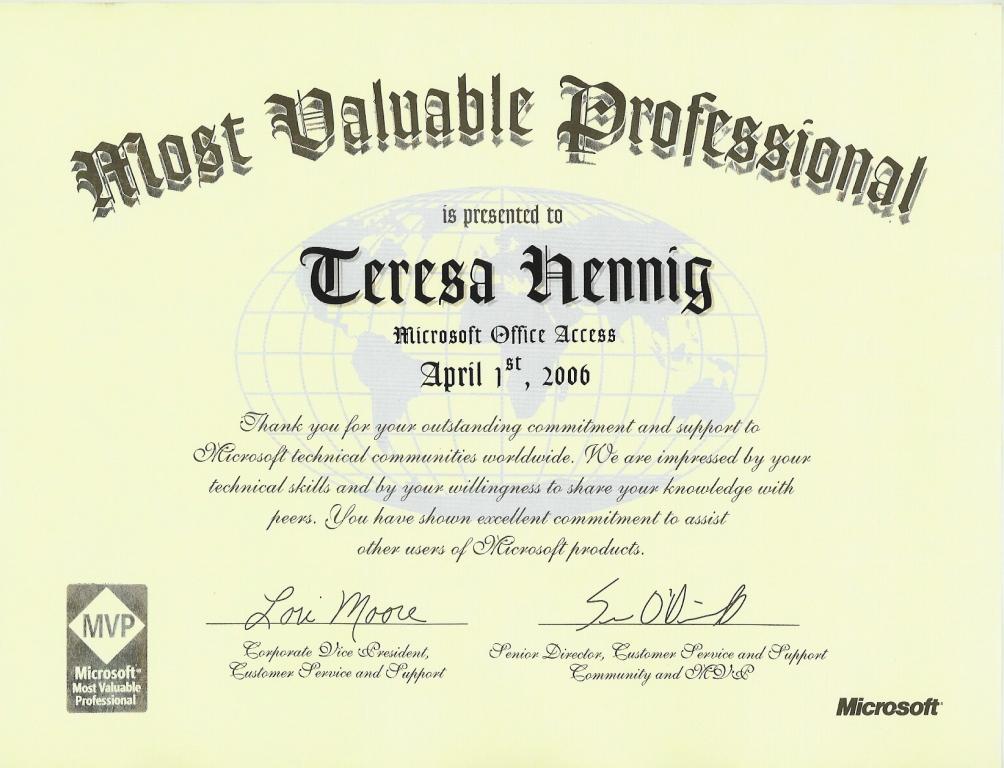
My thanks to the Access community for helping me to earn such a prestigious
award ... for eight consecutive years. 2006-through 2014.
Certificate
MVP
Page
|
|
(Return
to TOP)
|